Building a safe, effective sandbox to enable Codex on Windows

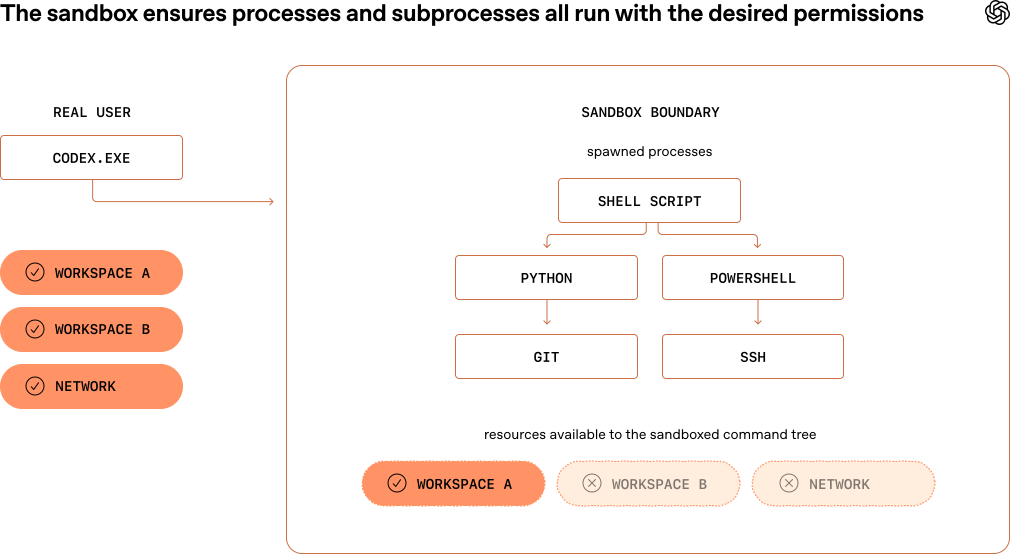
Building a safe, effective sandbox to enable Codex on Windows By David Wiesen, Member of Technical Staff When I joined the Codex engineering team in September 2025, Codex for Windows didn’t have a sandbox implementation meaning that Windows users were forced to choose between two subpar options when using OpenAI's coding agents: - Approving nearly every command (even reads) that a coding agent wanted to run, which is inefficient and pesky. A major benefit of using Codex is that you don’t have to do all the tedious work yourself. - Enabling Full Access mode: letting Codex run all commands without approval or restrictions, which removes friction at the expense of oversight. Codex, our coding agent, runs on developer laptops—whether that's through the CLI, the IDE extension, or the desktop app. It manages a conversation between a human at a keyboard and a model running in the cloud to handle inference. Codex runs with the permissions of a real user by default, meaning it can do everything the user can do. This is powerful and potentially dangerous. The coding model may tell the harness to run commands locally, from running tests to reading or editing a file to creating a Git branch, so Codex's default mode attempts to find the right balance between effectiveness and safety. This default mode allows Codex to read files almost anywhere and write files within your workspace (i.e., the directory where you're running Codex), with no internet access unless you specify you want it. To achieve this automatic constraint of writing files and accessing the network within safe bounds, Codex needs a sandbox environment that actually enforces these constraints. A sandbox is a constrained execution environment. When a developer uses Codex, their computer's operating system launches a command with reduced permissions, and those constraints propagate down the process tree. Every Codex command is sandboxed from the start, and every descendant process stays inside the same boundary. Codex needs isolation features enforced by the computer's operating system to implement an effective sandbox. Some operating systems provide utilities that do this well (e.g., Seatbelt on MacOs, seccomp or bubblewrap on Linux); however, Windows doesn't currently provide this type of capability out of the box. To make Codex just as safe and delightful to use on Windows as it already is everywhere else, we needed to implement our own sandbox. Windows offers some tools and primitives for isolation. While none of them quite met our requirements, we looked at a number of potential solutions—namely, AppContainer, Windows Sandbox, and Mandatory Integrity Control labeling. AppContainer - What: AppContainer is the native Windows sandbox, a capability-based isolation model built for apps that know, up front, exactly what they need to access. - Why: Appealing because it offers a real OS boundary instead of best-effort restrictions. - Why not: Codex is not one tightly scoped app. It drives open-ended developer workflows: shells, Git, Python, package managers, build tools, and whatever other binaries the agent decides it needs. In practice, that made AppContainer the…